
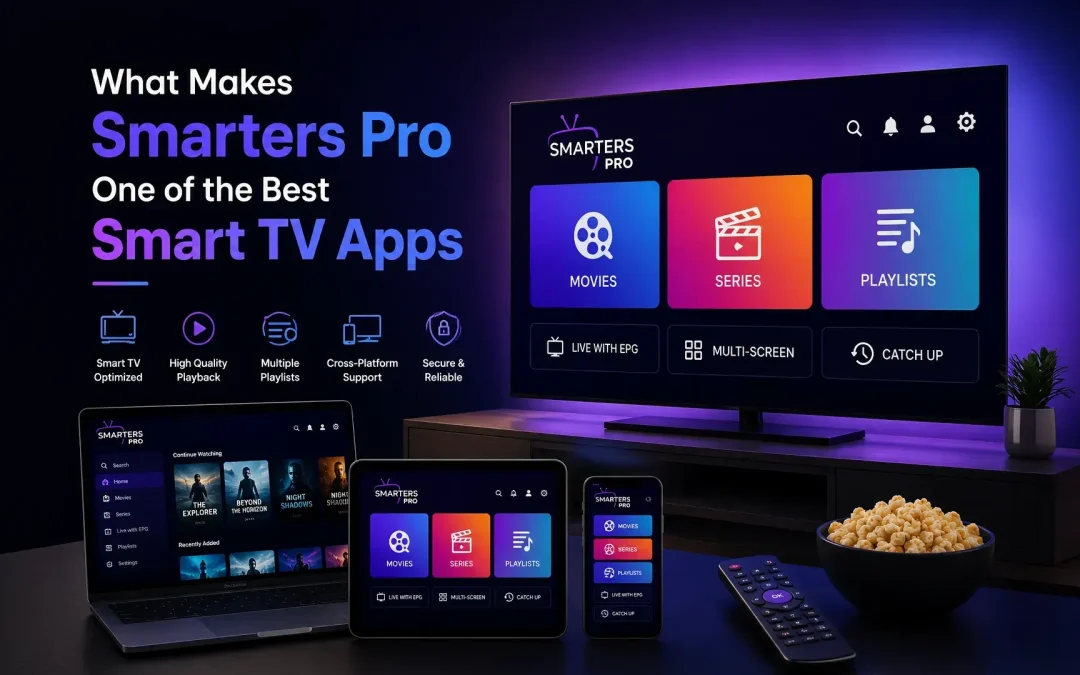
Today Smart TV apps are no longer just about finding something that can play a video. Viewers expect an app to be easy to navigate, responsive, flexible, and capable of fitting naturally into their everyday entertainment setup.With so many media players available for Smart TVs, the real question is: what makes one app more useful than another?
Smarters Pro stands out as a versatile media player for Smart TV users because it combines a straightforward interface, playlist support, flexible playback, and a viewing experience designed around modern connected devices. Its current Samsung Smart TV listing describes it as a media player supporting personally owned media from local and remote sources, with support for multiple playlist formats and cross-platform availability.
But features alone don’t determine whether an app is right for you. The overall experience matters just as much.
What Is Smarters Pro?
Smarters Pro is a media player designed to help users play and organize compatible media through a single application.It is important to understand that the application itself does not provide television channels, subscriptions, or copyrighted entertainment. Users add and manage their own legally acquired media and compatible playlists. This distinction is also stated in the current Smart TV app listing.
That makes Smarters Pro different from a conventional streaming subscription service. Instead of being the source of the content, it provides the player and interface through which compatible content can be accessed.
Why Is a Good Smart TV App Important?
Smart TVs have become more than just screens. They are now central entertainment hubs in many homes.Smarters Pro focuses on these everyday requirements rather than making the interface unnecessarily complicated.People use them for movies, series, personal media, online video, music, and other forms of digital entertainment. As a result, an app needs to make the viewing process feel simple rather than adding another layer of complexity.A good Smart TV app should ideally provide:
- Easy navigation
- A clean interface
- Reliable playback
- Playlist management
- Support for compatible media formats
- Convenient controls
- A comfortable big-screen experience
What Makes Smarters Pro a Best Smart TV Media Player?
1. Designed With Simplicity in Mind
One of the first things users notice about a Smart TV app is its interface.On a television, navigation is different from using a smartphone. You’re usually sitting several feet away and controlling everything with a remote.
Smarters Pro is built around a straightforward interface that makes it easier to browse available media and move between different sections.That simplicity can make a significant difference when you’re using the app regularly.
2. Supports Multiple Playlist Formats
Playlist compatibility is another important consideration when choosing a media player.Smarters Pro supports compatible formats including M3U and JSON playlists, allowing users to work with different types of personally owned or authorized media sources. Its current Google Play listing also identifies M3U and JSON among its supported playlist formats.
This flexibility can be particularly useful for users who already have their own organized media sources.However, format support doesn’t mean that every playlist will automatically work. Compatibility can depend on the source, formatting, server configuration, device, and application version.
3. A Better Fit for Big-Screen Entertainment
A Smart TV media player should feel natural on a large display.Small buttons, complicated menus, or interfaces designed primarily for touchscreens can become frustrating when controlled with a remote.
Smarters Pro is designed to provide a TV-friendly environment where users can browse and play their compatible content without needing to switch constantly between devices.The result is a more natural setup for people who prefer watching their content on a larger screen.
4. Supports a Multi-Device Lifestyle
Entertainment doesn’t happen on just one screen anymore.You might watch something on a smartphone during the day, use a tablet while traveling, and switch to a Smart TV when you’re at home.This is where a cross-platform media player can be useful.
The current Smarters Pro listing identifies availability across platforms including Android, iOS, Windows, and macOS, although specific features can vary between versions.Having a broader device ecosystem gives users more flexibility when deciding where they want to manage and play their compatible media.
5. Personalization Makes the Experience More Comfortable
People don’t all use their Smart TVs in the same way.Some prefer a simple setup. Others manage larger media collections and want more control over how their content is presented.
Smarters Pro includes personalization options intended to let users adjust aspects of their experience according to the capabilities of the particular version they use. Its current app listing highlights customizable settings as one of its features.Small customization options can make an app feel more comfortable over time.
6. Built Around Content Organization
Finding something to watch becomes harder when your content sources are poorly organized.A useful media player should help reduce that friction.
Smarters Pro provides an environment where compatible playlists and media can be accessed through one interface. Instead of treating every source as a completely separate experience, users can manage their available content within the player.For people who regularly work with multiple playlists, this can be more convenient than relying on several unrelated applications.
7. Playback Is at the Center of the Experience
At the end of the day, a media player needs to play media well.Smarters Pro’s current Google Play listing highlights high-quality playback and multiple decoder support, including an integrated VLC player in its latest listed update.
Playback performance can still depend on factors outside the app, including the quality of the media source, network connection, device hardware, and video format.That’s why it’s better to think of the application as one part of the overall viewing setup rather than expecting an app alone to solve every playback issue.
How Does Smarters Pro Compare With a Basic Video Player?
A basic video player may be sufficient if you only need to open and play individual video files. However, users who manage multiple playlists and different content sources may prefer a more organized solution. Compared with a basic video player, Smarters Pro offers playlist management, support for compatible M3U and JSON playlists, availability across supported platforms, and a Smart TV-friendly viewing experience. It is also designed to help users organize their compatible content through a single interface rather than relying on separate tools for different sources. Ultimately, the better choice depends on how you use your media player and whether you need simple playback or additional features for content organization and playlist management.
If you only play local files, a simple player may be enough. If you want a more organized environment for compatible playlists and multiple media sources, a dedicated media player can make more sense.
Is Smarters Pro an IPTV Service?
No.This is an important distinction.Smarters Pro is a media player, not a provider of ott subscriptions or channels.The application doesn’t supply the underlying content. Users must add content or playlists that they are legally authorized to access. The current Smart TV listing explicitly describes Smarters Pro as a standalone media player and states that users must add and manage their own legally acquired media.
This separation between the player and the content source is important when evaluating any streaming-related application.
Who Can Benefit From Smarters Pro?
It’s especially relevant for users who want their media experience to work naturally across a connected-device environment.Smarters Pro can be useful for people who:
- Prefer watching compatible media on a Smart TV
- Manage multiple playlists
- Want a centralized media-player interface
- Use several supported devices
- Prefer a simple television-friendly interface
- Want more flexibility than a basic video player provides
Final Thoughts
So, what makes Smarters Pro one of the best Smart TV apps in 2026?The answer comes down to its overall approach.
Rather than focusing on one particular feature, Smarters Pro brings together playlist support, content organization, multi-device flexibility, personalization, and a Smart TV-friendly viewing experience in one media player.Its current Smart TV listing confirms support for personally owned media, multiple playlist formats, and cross-platform availability, while its current Android listing highlights continued playback and performance improvements.
Of course, no media player is perfect for every viewer. Your choice should depend on your device, media sources, preferred features, and viewing habits.For users looking for a flexible Smart TV media player that can bring compatible content together in one convenient environment, Smarters Pro is a strong option to consider.
Frequently Asked Questions
What is Smarters Pro?
Smarters Pro is a media player that allows users to organize and play compatible media through a single application.
Is Smarters Pro a Smart TV app?
Yes. Smarters Pro is available on supported Smart TV platforms, including Samsung Smart TVs. Availability and features can vary by platform and region.
Does Smarters Pro provide channels or subscriptions?
No. It is a standalone media player. Users provide and manage their own legally authorized content.
Does Smarters Pro support M3U playlists?
Compatible versions support M3U playlists. The exact functionality can depend on the device and application version.
Does Smarters Pro support JSON playlists?
Yes, compatible versions support JSON playlists.
Can Smarters Pro be used on multiple devices?
Smarters Pro is available across supported platforms, including Android, iOS, Windows, macOS, and compatible Smart TVs.
Is Smarters Pro suitable for Smart TVs?
Yes. Its Smart TV version is designed around a large-screen media experience with an interface intended for television use.
What makes a good Smart TV media player?
Useful features include simple navigation, playlist compatibility, content organization, reliable playback, device compatibility, and appropriate customization options.